检测报告订阅及查询
基于应用(app_id)的检测报告分发:晓葆生成报告后通过 Webhook 通知渠道, 渠道凭报告 ID 回拉含完整原始设备数据(raw_data)的报告快照。
实现状态:Webhook 推送与签名机制已上线;
health-reports 接口返回 raw_data 与按 app_id 隔离为目标契约,待开发,以本文为联调基准。概述与流程
设计原则:推送只带摘要,完整内容一律回拉。渠道只能收到、查询自己应用下的报告。
| 方向 | 方式 | 说明 |
|---|---|---|
| 平台 → 渠道 | Webhook health.report.created / updated | 报告生成或更新时通知,HMAC 签名,失败自动重试 |
| 渠道 → 平台 | GET /open/v1/health-reports/{openReportId} | 回拉报告快照,含 raw_data |
端到端流程:
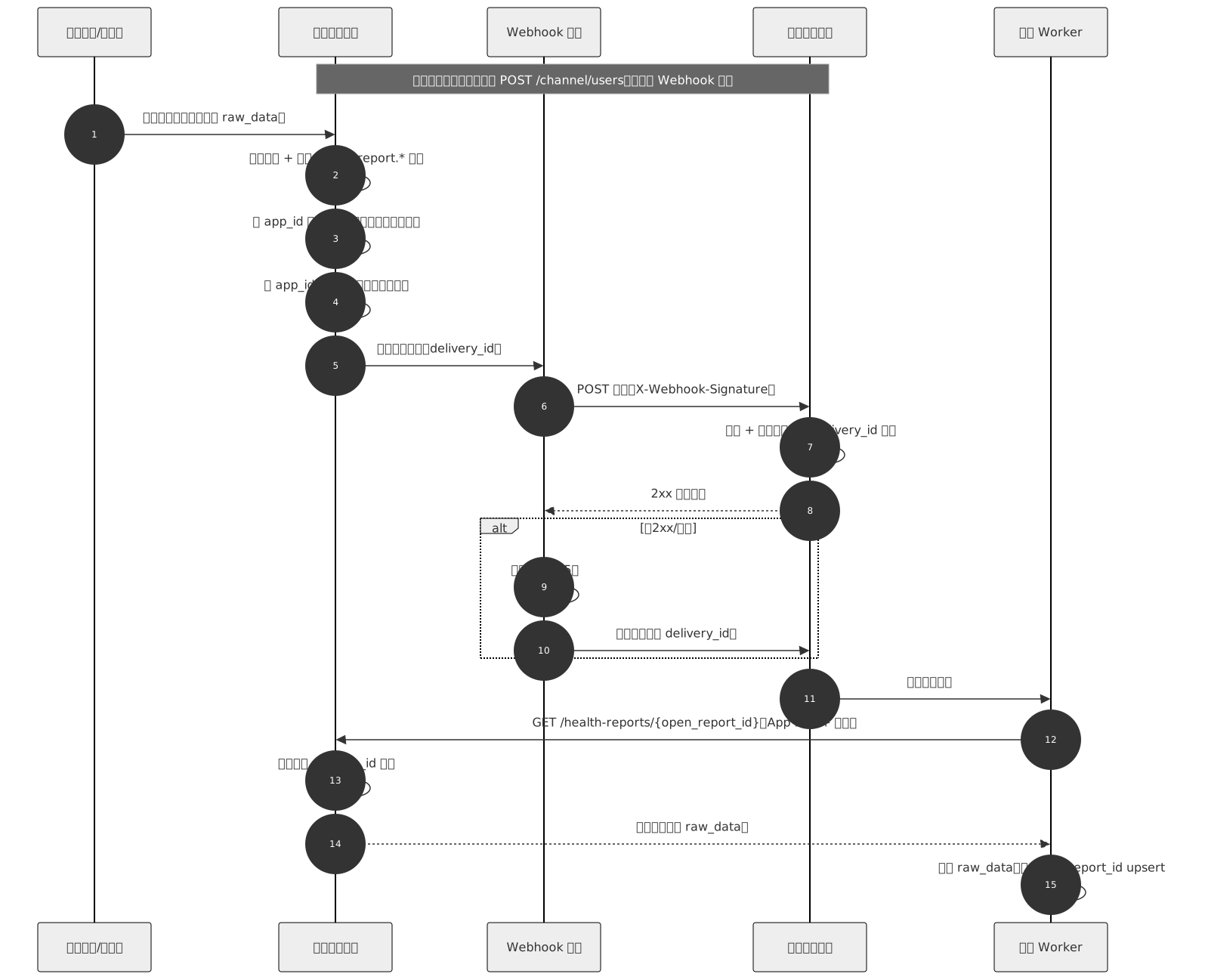
渠道侧处理决策:

接入前准备
| 项 | 说明 |
|---|---|
| App Key / App Secret | 开放平台分配;Secret 仅服务端保存,禁止下发到前端 / App |
| Webhook 端点 | 渠道提供公网 HTTPS URL,在开发者门户应用设置中配置;解析到内网地址的 URL 会被拒绝且不重试 |
| Webhook Secret | 每个端点独立,用于验签推送,与 App Secret 不同 |
| 订阅事件 | 如 health.report.created;支持通配 health.report.*;不指定则订阅全部事件 |
| 用户绑定 | 只有已建立渠道绑定的用户,其报告才会推送,见用户绑定 |
事件推送
事件类型:
| 事件 | 含义 |
|---|---|
health.report.created | 新报告生成 |
health.report.updated | 报告更新(如重新解读) |
请求头:
| Header | 说明 |
|---|---|
X-Webhook-Id | 本次投递唯一 ID(等于 body 中的 delivery_id) |
X-Webhook-Event | 事件类型 |
X-Webhook-Timestamp | Unix 秒级时间戳 |
X-Webhook-Signature | 签名,见验签 |
请求体示例:
{
  "event": "health.report.created",
  "open_user_id": 10001,
  "channel_user_id": "u_abc123",
  "open_report_id": 5566,
  "report_type": "BLOOD_PRESSURE",
  "occurred_at": "2026-10-14T10:30:00+08:00",
  "delivery_id": "6f1c0b7e-3b7a-4d6e-9a53-1d3c1f1c9a11"
}| 字段 | 类型 | 说明 |
|---|---|---|
event | string | 事件类型 |
open_user_id | integer | 开放平台用户 ID |
channel_user_id | string | 渠道侧用户标识(绑定时由渠道提供) |
open_report_id | integer | 报告 ID,用于回拉 |
report_type | string | 报告类型 |
occurred_at | string | 事件发生时间(ISO 8601) |
delivery_id | string | 投递幂等 ID,同一次投递跨重试不变 |
Webhook 验签
signature = HMAC-SHA256( timestamp + "." + rawBody , webhook_secret ) // 十六进制小写rawBody必须是收到的原始字节,不要先解析再序列化- 校验
X-Webhook-Timestamp与当前时间差(建议 ≤ 5 分钟)防重放 - 签名比较使用常量时间比较
PHP
$ts   = $_SERVER['HTTP_X_WEBHOOK_TIMESTAMP'];
$sig  = $_SERVER['HTTP_X_WEBHOOK_SIGNATURE'];
$raw  = file_get_contents('php://input');
$calc = hash_hmac('sha256', $ts . '.' . $raw, $webhookSecret);
if (!hash_equals($calc, $sig) || abs(time() - (int)$ts) > 300) {
    http_response_code(401); exit;
}
Java(Spring)
@PostMapping("/webhook/apex")
public ResponseEntity<String> receive(@RequestBody byte[] raw,
        @RequestHeader("X-Webhook-Timestamp") String ts,
        @RequestHeader("X-Webhook-Signature") String sig) throws Exception {
    Mac mac = Mac.getInstance("HmacSHA256");
    mac.init(new SecretKeySpec(webhookSecret.getBytes(UTF_8), "HmacSHA256"));
    mac.update((ts + ".").getBytes(UTF_8));
    String calc = HexFormat.of().formatHex(mac.doFinal(raw));
    boolean ok = MessageDigest.isEqual(calc.getBytes(UTF_8), sig.getBytes(UTF_8))
            && Math.abs(System.currentTimeMillis() / 1000 - Long.parseLong(ts)) <= 300;
    return ok ? ResponseEntity.ok("ok") : ResponseEntity.status(401).build();
}
Python(Flask)
import hmac, hashlib, time
from flask import request, abort

@app.post("/webhook/apex")
def receive():
    ts  = request.headers["X-Webhook-Timestamp"]
    sig = request.headers["X-Webhook-Signature"]
    raw = request.get_data()  # 原始字节
    calc = hmac.new(WEBHOOK_SECRET.encode(), ts.encode() + b"." + raw, hashlib.sha256).hexdigest()
    if not hmac.compare_digest(calc, sig) or abs(time.time() - int(ts)) > 300:
        abort(401)
    return "ok"
Node.js(Express)
const crypto = require('crypto');
// 必须用 raw 解析,保留原始字节
app.post('/webhook/apex', express.raw({ type: 'application/json' }), (req, res) => {
  const ts  = req.header('X-Webhook-Timestamp');
  const sig = req.header('X-Webhook-Signature');
  const calc = crypto.createHmac('sha256', WEBHOOK_SECRET)
    .update(Buffer.concat([Buffer.from(ts + '.'), req.body])).digest('hex');
  const ok = sig && calc.length === sig.length
    && crypto.timingSafeEqual(Buffer.from(calc), Buffer.from(sig))
    && Math.abs(Date.now() / 1000 - Number(ts)) <= 300;
  return ok ? res.send('ok') : res.sendStatus(401);
});
Go
func receive(w http.ResponseWriter, r *http.Request) {
	raw, _ := io.ReadAll(r.Body)
	ts := r.Header.Get("X-Webhook-Timestamp")
	sig := r.Header.Get("X-Webhook-Signature")
	mac := hmac.New(sha256.New, []byte(webhookSecret))
	mac.Write([]byte(ts + "."))
	mac.Write(raw)
	calc := hex.EncodeToString(mac.Sum(nil))
	t, _ := strconv.ParseInt(ts, 10, 64)
	if !hmac.Equal([]byte(calc), []byte(sig)) || math.Abs(float64(time.Now().Unix()-t)) > 300 {
		http.Error(w, "unauthorized", 401)
		return
	}
	w.Write([]byte("ok"))
}
应答与重试
- 返回任意 2xx 视为成功;其他状态码、超时(10 秒)、连接失败均重试
- 最多 5 次,间隔依次约 1 分钟、5 分钟、30 分钟、2 小时、6 小时
- 重试会导致重复投递:必须按
delivery_id幂等去重 - 不保证事件顺序,以回拉快照为准
业务处理耗时较长时,先返回 200,再异步处理,避免触发重试。
报告查询
GET/open/v1/health-reports/{openReportId}
路径参数:
| 参数 | 类型 | 说明 |
|---|---|---|
openReportId | integer | 开放平台报告 ID,即 Webhook 中的 open_report_id |
请求头:
| Header | 必填 | 说明 |
|---|---|---|
X-App-Key | 是 | 应用 Key |
X-Timestamp | 是 | Unix 秒级时间戳,与服务器偏差 ≤ 300 秒 |
X-Nonce | 否 | 随机串 |
X-Signature | 是 | 请求签名 |
签名算法:
signString = METHOD + "\n" + URI + "\n" + timestamp + "\n" + nonce + "\n" + sha256_hex(body)
signature = HMAC-SHA256(signString, app_secret) // 十六进制小写METHOD大写;URI为含查询串的请求路径(如/open/v1/health-reports/5566)- GET 无请求体,
body为空串,sha256_hex("")仍参与计算
成功响应(200 OK):
{
  "success": true,
  "code": 0,
  "message": "获取成功",
  "data": {
    "id": 5566,
    "app_id": 12,
    "open_user_id": 10001,
    "open_member_id": null,
    "request_report_id": "M202610140001",
    "report_type": "BLOOD_PRESSURE",
    "file_path": "reports/2026/10/xxx.pdf",
    "interpretation_result": "血压偏高,建议复测",
    "interpretation_detail": {},
    "interpretation_method": "ai",
    "is_viewed": false,
    "uploaded_at": "2026-10-14T10:29:00+08:00",
    "examined_at": "2026-10-14T10:28:00+08:00",
    "interpreted_at": "2026-10-14T10:30:00+08:00",
    "device_sn": "SN123456",
    "measurement_no": "M202610140001",
    "meta": {
      "points_code": "ST001",
      "data_source": "station",
      "operator_name": "张三",
      "operator_xiaobao_user_id": 2001
    },
    "raw_data": {
      "data_source": "station",
      "data_type": "indicators",
      "device_sn": "SN123456",
      "device_model": "OMRON_HEM7320",
      "points_code": "ST001",
      "measured_at": "2026-10-14 10:28:00",
      "indicators": [
        { "code": "BP_SBP",   "value": 148, "unit": "mmHg" },
        { "code": "BP_DBP",   "value": 96,  "unit": "mmHg" },
        { "code": "BP_PULSE", "value": 78,  "unit": "bpm" }
      ],
      "metadata": {
        "operator_name": "张三",
        "operator_xiaobao_user_id": 2001
      },
      "client_request_id": "SN123456:1760408880"
    }
  },
  "timestamp": "2026-10-14T10:31:00+08:00"
}
data 字段说明:
| 字段 | 类型 | 说明 |
|---|---|---|
id | integer | 报告 ID,即 open_report_id |
app_id | integer | 应用 ID |
open_user_id | integer | 开放平台用户 ID |
open_member_id | integer | null | 家庭成员 ID |
request_report_id | string | null | 上报侧报告号 |
measurement_no | string | null | 检测编号 |
device_sn | string | null | 设备序列号 |
report_type | string | null | 报告类型 |
file_path | string | null | 报告文件路径 |
interpretation_result / detail / method | string | object | null | 解读结果、详情、方式 |
is_viewed | boolean | 是否已查看 |
uploaded_at / examined_at / interpreted_at | string | null | 上传 / 检查 / 解读时间(ISO 8601) |
meta.points_code | string | null | 健康站编码 |
meta.operator_name | string | null | 检测操作人(非被测人) |
raw_data | object | null | 完整原始设备报告,检测指标以此为准,见下节 |
检测指标与 raw_data
检测指标不单独返回,统一从 data.raw_data 读取。部分设备的指标不会写入结构化指标表,raw_data 才是完整的原始设备报告。
- 一次检测只有一份
raw_data,原样存储、不做字段清洗,结构随设备 / 数据类型不同, 渠道需按device_model/report_type分别解析 - 厂家设备报告完整保存在
raw_data.report.raw_data(含异步回填,如心电算法结果); 同级的indicators[]、metadata为上报时的结构化补充信息 - 解析请容错:字段缺失、新增字段均属正常,不要因未知字段报错
- 心电波形等大字段(如
dat_base64)不在raw_data内,不随接口返回
示例 1:平铺指标(血压计,多指标)
{
  "data_source": "station",
  "data_type": "indicators",
  "device_sn": "BP-OMRON-001",
  "device_model": "OMRON_HEM7320",
  "measured_at": "2026-10-14 10:28:00",
  "indicators": [
    { "code": "BP_SBP",   "value": 148, "unit": "mmHg" },
    { "code": "BP_DBP",   "value": 96,  "unit": "mmHg" },
    { "code": "BP_PULSE", "value": 78,  "unit": "bpm" }
  ]
}
示例 2:分组指标(一个指标码下多个子指标)
{
  "data_source": "station",
  "data_type": "indicators",
  "device_sn": "BP-OMRON-001",
  "measured_at": "2026-10-14 10:28:00",
  "indicators": [
    {
      "indicator_code": "BP_MANUAL",
      "values": [
        { "key": "BP_SBP",   "value": 148, "unit": "mmHg" },
        { "key": "BP_DBP",   "value": 96,  "unit": "mmHg" },
        { "key": "BP_PULSE", "value": 78,  "unit": "bpm" }
      ]
    }
  ]
}
示例 3:复杂报告(心电,厂家报告在 report.raw_data)
{
  "data_source": "station",
  "data_type": "report",
  "device_sn": "ECG-001",
  "device_model": "ECG12LEAD_V2",
  "measured_at": "2026-10-14 10:15:00",
  "report": {
    "report_type": "ecg",
    "request_report_id": "VENDOR_ECG_20261014001",
    "raw_data": {
      "conclusion": "正常心电图",
      "heart_rate": 72,
      "rhythm": "窦性心律"
    }
  }
}
示例 4:可穿戴(设备自有字段)
{
  "data_source": "wearable",
  "data_type": "indicators",
  "device_sn": "AA:BB:CC:DD:EE:FF",
  "device_model": "QC_RING_PRO",
  "measured_at": "2026-10-14 08:00:00",
  "raw_data": {
    "hr_avg": 68,
    "hr_max": 95,
    "hr_min": 52,
    "hr_data": [0, 0, 65, 68, 72]
  }
}
解析建议:厂家完整报告优先取
raw_data.report.raw_data;带结构化指标的设备(如血压计) 同时可取 raw_data.indicators[];都取不到时保存 raw_data 原文,留待人工 / 设备方文档解析。多语言调用示例
URI 必须与实际请求路径一字不差;{host} 替换为 Base URL(见Base URL 与环境)。
curl + openssl
APP_KEY="your_app_key"; APP_SECRET="your_app_secret"
URI="/open/v1/health-reports/5566"
TS=$(date +%s); NONCE=$(openssl rand -hex 8)
BODY_HASH=$(printf '' | openssl dgst -sha256 | awk '{print $NF}')
SIGN_STR=$(printf 'GET\n%s\n%s\n%s\n%s' "$URI" "$TS" "$NONCE" "$BODY_HASH")
SIG=$(printf '%s' "$SIGN_STR" | openssl dgst -sha256 -hmac "$APP_SECRET" | awk '{print $NF}')

curl -s "https://{host}$URI" \
  -H "X-App-Key: $APP_KEY" -H "X-Timestamp: $TS" \
  -H "X-Nonce: $NONCE" -H "X-Signature: $SIG"
PHP
$uri   = '/open/v1/health-reports/5566';
$ts    = time();
$nonce = bin2hex(random_bytes(8));
$sign  = hash_hmac('sha256',
    implode("\n", ['GET', $uri, $ts, $nonce, hash('sha256', '')]), $appSecret);

$ch = curl_init("https://{host}{$uri}");
curl_setopt_array($ch, [
    CURLOPT_RETURNTRANSFER => true,
    CURLOPT_HTTPHEADER => [
        "X-App-Key: {$appKey}", "X-Timestamp: {$ts}",
        "X-Nonce: {$nonce}", "X-Signature: {$sign}",
    ],
]);
$raw = json_decode(curl_exec($ch), true)['data']['raw_data'] ?? null;
Java
String uri = "/open/v1/health-reports/5566";
String ts = String.valueOf(System.currentTimeMillis() / 1000);
String nonce = UUID.randomUUID().toString().replace("-", "");
String bodyHash = HexFormat.of().formatHex(
        MessageDigest.getInstance("SHA-256").digest(new byte[0]));
String signStr = String.join("\n", "GET", uri, ts, nonce, bodyHash);
Mac mac = Mac.getInstance("HmacSHA256");
mac.init(new SecretKeySpec(appSecret.getBytes(UTF_8), "HmacSHA256"));
String sig = HexFormat.of().formatHex(mac.doFinal(signStr.getBytes(UTF_8)));

HttpRequest req = HttpRequest.newBuilder(URI.create("https://{host}" + uri))
        .header("X-App-Key", appKey).header("X-Timestamp", ts)
        .header("X-Nonce", nonce).header("X-Signature", sig).GET().build();
String resp = HttpClient.newHttpClient()
        .send(req, HttpResponse.BodyHandlers.ofString()).body();
Python
import hashlib, hmac, secrets, time, requests

uri = "/open/v1/health-reports/5566"
ts, nonce = str(int(time.time())), secrets.token_hex(8)
sign_str = "\n".join(["GET", uri, ts, nonce, hashlib.sha256(b"").hexdigest()])
sig = hmac.new(APP_SECRET.encode(), sign_str.encode(), hashlib.sha256).hexdigest()

r = requests.get("https://{host}" + uri, headers={
    "X-App-Key": APP_KEY, "X-Timestamp": ts, "X-Nonce": nonce, "X-Signature": sig,
})
raw = r.json()["data"]["raw_data"]
Node.js
const crypto = require('crypto');
const uri = '/open/v1/health-reports/5566';
const ts = String(Math.floor(Date.now() / 1000));
const nonce = crypto.randomBytes(8).toString('hex');
const bodyHash = crypto.createHash('sha256').update('').digest('hex');
const sig = crypto.createHmac('sha256', APP_SECRET)
  .update(['GET', uri, ts, nonce, bodyHash].join('\n')).digest('hex');

const res = await fetch('https://{host}' + uri, {
  headers: { 'X-App-Key': APP_KEY, 'X-Timestamp': ts, 'X-Nonce': nonce, 'X-Signature': sig },
});
const raw = (await res.json()).data.raw_data;
Go
uri := "/open/v1/health-reports/5566"
ts := strconv.FormatInt(time.Now().Unix(), 10)
nb := make([]byte, 8); rand.Read(nb)
nonce := hex.EncodeToString(nb)
bh := sha256.Sum256(nil)
signStr := strings.Join([]string{"GET", uri, ts, nonce, hex.EncodeToString(bh[:])}, "\n")
mac := hmac.New(sha256.New, []byte(appSecret))
mac.Write([]byte(signStr))
sig := hex.EncodeToString(mac.Sum(nil))

req, _ := http.NewRequest("GET", "https://{host}"+uri, nil)
req.Header.Set("X-App-Key", appKey)
req.Header.Set("X-Timestamp", ts)
req.Header.Set("X-Nonce", nonce)
req.Header.Set("X-Signature", sig)
resp, _ := http.DefaultClient.Do(req)
错误码
| HTTP | code | 说明 | 处理建议 |
|---|---|---|---|
| 401 | MISSING_APP_KEY / INVALID_SIGNATURE | 缺少 App Key、签名错误或时间戳过期 | 检查签名算法、时间戳、Secret |
| 404 | — | 报告不存在或不属于本应用 | 确认 openReportId;不要重试 |
| 429 | — | 触发限流(默认 60 次 / 分钟 / 应用) | 降速并指数退避重试 |
渠道侧处理建议
- Webhook 入口只做:验签 → 按
delivery_id去重 → 入队 → 返回 200 - Worker 异步回拉快照并落库,以
open_report_id做 upsert updated事件覆盖本地快照;平台不提供报告删除事件- 定期对账:对长时间未收到推送的用户,可用已知
open_report_id回拉补偿 - 某次投递 5 次均失败后不再自动重投,需联系平台补发
用户绑定
报告推送依赖渠道绑定关系:
- 渠道通过
POST /open/v1/channel/users注册并绑定用户(幂等),channel_user_id由渠道提供, 详见用户数据互通 - 无绑定的用户产生的报告不会推送给该渠道
联调与上线
| 步骤 | 内容 |
|---|---|
| 1 | 领取 App Key / Secret,配置 Webhook URL 与订阅事件,获取 Webhook Secret |
| 2 | 完成用户注册绑定 |
| 3 | 沙箱触发测试推送,验证验签与幂等 |
| 4 | 回拉 health-reports,验证快照与 raw_data |
| 5 | 切换生产 Key 与 URL,观察投递状态与重试情况 |
常见问题:
- 收不到推送:端点未启用或未订阅该事件;用户未绑定;URL 解析到内网
- 验签失败:确认使用原始 body、Webhook Secret(非 App Secret)、时间戳单位为秒
- 重复收到:属正常重试,按
delivery_id去重